> ## Documentation Index
> Fetch the complete documentation index at: https://docs.signalmd.dev/llms.txt
> Use this file to discover all available pages before exploring further.
# Fix an issue
> Go from an issue on the board to a shipped change in your agent, and confirm the change worked.
This guide takes one issue from the board to a change live in Retell, then to the evidence that it worked. It assumes you have connected an agent and imported calls. If not, start with the [Quickstart](/quickstart).
## 1. Pick an issue
Start at the top of **Fix** on **Overview**, or open **Issues** for the full list under **To fix**. Rows are in [priority order](/concepts/issues#how-the-board-is-ordered), and each shows the place, the **Kind**, **Calls** and the share that ended badly under **Bad**. Filter by **Technical**, **Flow** or **Content** to find work for one person.
* **A Fix row that says "Outside your agent"** has its fix with whoever runs that service, such as an API that answers slowly. Take the evidence to them; a change in your agent can only soften the effect.
* **An Improve row** is not a malfunction. It names a change that is yours to make and the number it moves.
* **Rows under Cause not established** are not ready to fix. See [When the cause is not established](#when-the-cause-is-not-established).
Take the top **Fix** issue unless you know a reason not to, and set it to **Investigating** from the status menu at the top of the issue.
## 2. Read the issue
The figures at the top say what you are deciding about: **Calls** (calls, callers and share of all calls), **Ended badly**, **Confidence** and **Seen on**. Some issues show **Lasting harm** and **Checked** instead. Then read, in order:
1. **The place**, under the title: a step, a tool or a transition. An issue placed on "the agent overall" has no single place to change, and is harder to act on.
2. **Cause**: what the calls point to, such as "Waiting on lookup\_vehicle" with how long it took.
3. **Suggested fix**: one change to make. Treat it as a proposal to check against the calls, not an instruction.
**In the configuration**, on the right, lists what the current configuration says at this step or tool, such as a transition with no fallback. It is read from the configuration, not from these calls, so it is never offered as the cause.
## 3. Check the calls behind it
An issue is a hypothesis backed by calls. Before anyone changes the agent, read some of them:
* Open three to five quotes under **Evidence**. Each opens its call at that moment.
* Use **Recent calls**, or **View calls** for the full list.
* Ask whether every call shows the same thing at the same place, whether it is behaviour you designed (a questionnaire that revisits a step on purpose), and whether it is the same change as another issue.
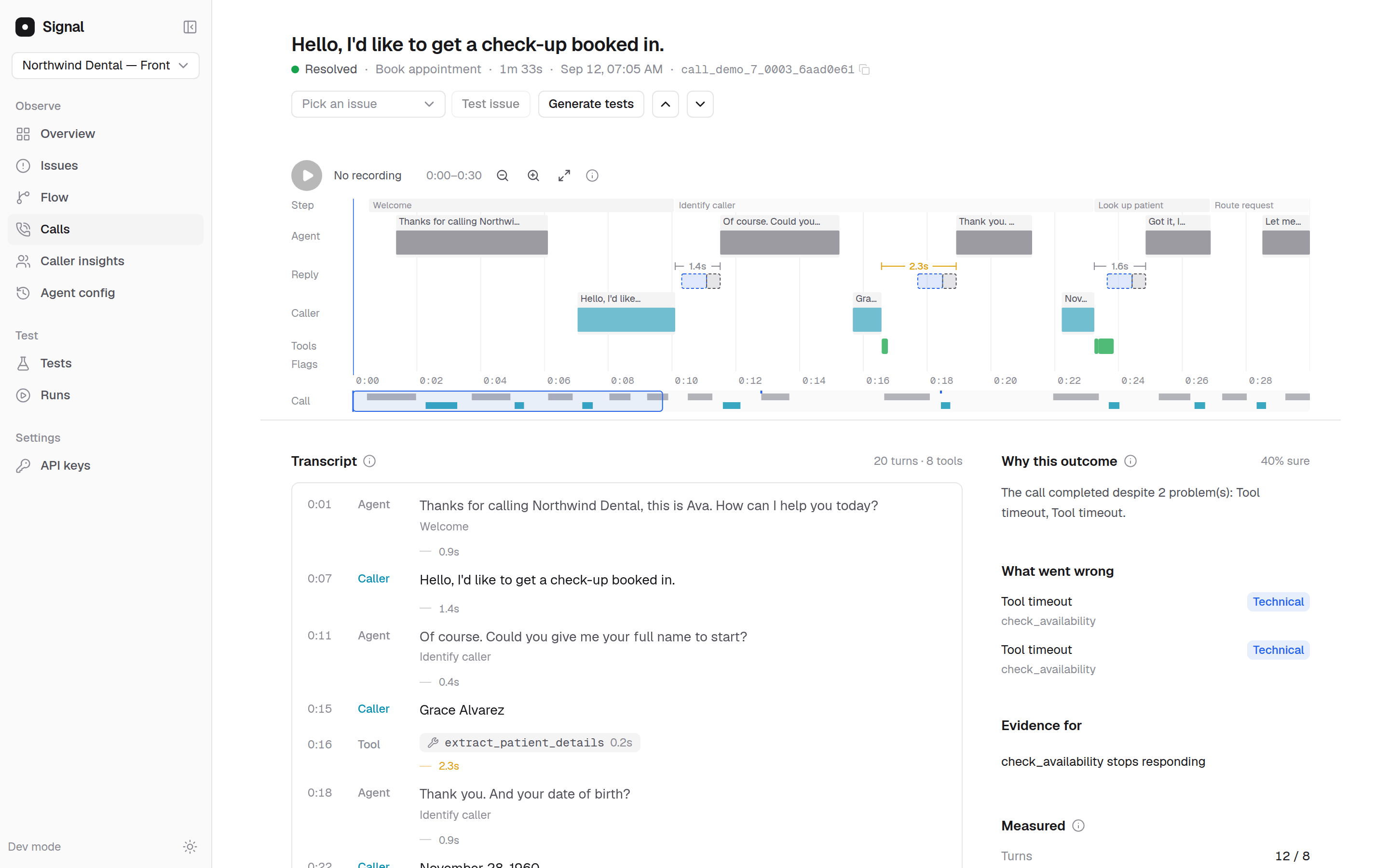 Then answer **Is this real?** on the issue. **No** asks for a reason, such as **Meant to work that way** or **Not for that reason**, and the issue leaves the board for good. See [Is this real?](/concepts/issues#is-this-real).
## 4. Decide the lane and the owner
The [lane](/concepts/lanes) is where the cause lives, and it decides who makes the change:
| Lane | What usually changes | Usually done by |
| - | - | - |
| Hearing | Speech recognition keywords for that question, or a read-back in the flow | Whoever owns the agent in Retell |
| Understanding | The step's prompt, the global prompt, or the knowledge base | Whoever owns the prompts and content |
| Flow and state | Transitions, their conditions, and when values are captured or reset | Whoever designs the flow |
| Speaking | The model, prompt length, voice, responsiveness and interruption settings | Whoever owns the agent in Retell |
| Integrations | The tool, the system behind it, or which tools run and in what order | A backend engineer |
The **Kind** tag is not the lane: **Technical** covers a misheard word (Hearing) and a failing lookup (Integrations), which are different fixes for different people.
Aim the change at the cause, not the symptom. If callers sit through 7 seconds of silence while three tools run one after another, a "one moment while I check" line shortens the silence the board measures, but the lookup still takes 7 seconds. That is a Speaking change to an Integrations problem.
## 5. Make the change in Retell
Make the change in Retell and publish it. Where you can, ship one change per version: a version that changes the prompt, a tool and the voice at once can still be compared, but you will not know which change did what. Set the issue to **Fix deployed** once it is live. Signal picks up the new version within about 10 minutes, or at once when you publish from **Build**.
The AI copilot can draft a prompt or flow change for you. On **Build**, **Draft a fix** next to an issue hands it to the copilot, which reads the issue's calls, writes a draft and can test it before an admin publishes it. See [Build](/copilot/build).
## 6. Confirm it worked
**Before callers meet it, test it.** **Generate tests** on the issue page proposes replays of its calls and variations of them, which you run against the new version. Tests run as text, so they cover Understanding, Flow and state, and Integrations; an issue that needs audio or timing cannot be tested this way yet, and Signal says so. See [Test a fix](/guides/test-a-fix).
**After it ships, wait out the grace period.** Set the issue to **Measuring**. Above the bars in **By version**, one sentence says whether the live version fixed it. It reads "Too early to say" until the new version has taken calls for the grace period (7 days by default), then says whether the new version fixed it, cut it, raised it or left it unchanged, or that there are too few calls to say yet. A fixed issue is tagged **Fixed on v12** on **Issues**. See [Did my fix work](/concepts/issues#did-my-fix-work).
**For the whole agent, compare versions.** The comparison for the change, such as **v11 → v12** on **Agent config**, shows whether the change helped or hurt anything else. See [Compare versions](/guides/compare-versions).
You do not have to mark the issue **Resolved**: once your agent has taken calls for the grace period without it, Signal resolves it. A call that started after the resolution and shows it again turns it **Regressed**; calls from before your fix do not reopen it.
## When the cause is not established
Sometimes the calls show that something went wrong but not why. Signal lists the pattern under **Cause not established** on **Issues**, heads the issue page **What was seen** and **What to check**, and proposes no change. That is a real result, not a gap to fill with a guess.
* **Read the calls for what they share:** the same step, tool, kind of caller or time of day.
* **Check In the configuration** for a transition with no fallback or a variable that is never set, as a lead to check against the calls.
* **Wait for more calls.** Signal keeps reading the pattern as calls arrive, and it moves to **Fix** once Signal establishes a cause.
* **If you try a fix anyway, say so** in your team's tracker, so nobody later reads the version comparison as proof of a cause.
## Worked example
This example is illustrative. The agent, tool and numbers are made up to show the steps.
An insurance agent's board shows at the top of **Fix**:
* **Waiting on lookup\_vehicle**, kind **Technical**, place: tool lookup\_vehicle, with "Outside your agent" under the title.
* **Calls** 31, "27 callers, 6.2% of all calls". **Ended badly** 39%. **Confidence** 86%. **Seen on** v11.
* **Cause**: "Waiting on lookup\_vehicle. lookup\_vehicle took 9.2s."
* **Suggested fix**: measure the tool at the times these calls happened, make it faster or return a partial result, and have the agent say a short line while it runs.
**Check the calls.** Five evidence quotes sit right after the caller reads out their registration. In each, the line is silent for 8 to 10 seconds, and three callers say "Hello?" before the agent speaks. The tool's measured time overlaps the silence. Answer **Yes** on **Is this real?**.
**Decide the lane.** The tool is slow, so this is Integrations, and the owner is the engineer behind the vehicle lookup. A holding line alone would be a Speaking change that makes the silence feel shorter without making the lookup faster.
**Make the change.** The engineer adds a cache for repeat registrations. In Retell, the agent gets a short line to say while the tool runs. Both ship as v12.
**Confirm it.** Tests replay recorded tool responses instantly, so **Test issue** explains that this issue needs a real call. Production answers instead: **v11 → v12** on **Agent config** shows **Reply time** down from 2.1 s to 1.6 s, and seven days after v12 went live the line above **By version** reads "v12 fixed it: none of its 240 calls over 7 days shows it, against 31 of 500 before". **Got it done** moved from 71% to 74%, within noise. That is fine: the fix was aimed at a wait, and the wait went away.
## Next steps
Replay production calls against a change before it ships.
Read a version comparison and decide what to do next.
This documentation is built and hosted on [Mintlify](https://mintlify.com), a developer documentation platform.
Then answer **Is this real?** on the issue. **No** asks for a reason, such as **Meant to work that way** or **Not for that reason**, and the issue leaves the board for good. See [Is this real?](/concepts/issues#is-this-real).
## 4. Decide the lane and the owner
The [lane](/concepts/lanes) is where the cause lives, and it decides who makes the change:
| Lane | What usually changes | Usually done by |
| - | - | - |
| Hearing | Speech recognition keywords for that question, or a read-back in the flow | Whoever owns the agent in Retell |
| Understanding | The step's prompt, the global prompt, or the knowledge base | Whoever owns the prompts and content |
| Flow and state | Transitions, their conditions, and when values are captured or reset | Whoever designs the flow |
| Speaking | The model, prompt length, voice, responsiveness and interruption settings | Whoever owns the agent in Retell |
| Integrations | The tool, the system behind it, or which tools run and in what order | A backend engineer |
The **Kind** tag is not the lane: **Technical** covers a misheard word (Hearing) and a failing lookup (Integrations), which are different fixes for different people.
Aim the change at the cause, not the symptom. If callers sit through 7 seconds of silence while three tools run one after another, a "one moment while I check" line shortens the silence the board measures, but the lookup still takes 7 seconds. That is a Speaking change to an Integrations problem.
## 5. Make the change in Retell
Make the change in Retell and publish it. Where you can, ship one change per version: a version that changes the prompt, a tool and the voice at once can still be compared, but you will not know which change did what. Set the issue to **Fix deployed** once it is live. Signal picks up the new version within about 10 minutes, or at once when you publish from **Build**.
The AI copilot can draft a prompt or flow change for you. On **Build**, **Draft a fix** next to an issue hands it to the copilot, which reads the issue's calls, writes a draft and can test it before an admin publishes it. See [Build](/copilot/build).
## 6. Confirm it worked
**Before callers meet it, test it.** **Generate tests** on the issue page proposes replays of its calls and variations of them, which you run against the new version. Tests run as text, so they cover Understanding, Flow and state, and Integrations; an issue that needs audio or timing cannot be tested this way yet, and Signal says so. See [Test a fix](/guides/test-a-fix).
**After it ships, wait out the grace period.** Set the issue to **Measuring**. Above the bars in **By version**, one sentence says whether the live version fixed it. It reads "Too early to say" until the new version has taken calls for the grace period (7 days by default), then says whether the new version fixed it, cut it, raised it or left it unchanged, or that there are too few calls to say yet. A fixed issue is tagged **Fixed on v12** on **Issues**. See [Did my fix work](/concepts/issues#did-my-fix-work).
**For the whole agent, compare versions.** The comparison for the change, such as **v11 → v12** on **Agent config**, shows whether the change helped or hurt anything else. See [Compare versions](/guides/compare-versions).
You do not have to mark the issue **Resolved**: once your agent has taken calls for the grace period without it, Signal resolves it. A call that started after the resolution and shows it again turns it **Regressed**; calls from before your fix do not reopen it.
## When the cause is not established
Sometimes the calls show that something went wrong but not why. Signal lists the pattern under **Cause not established** on **Issues**, heads the issue page **What was seen** and **What to check**, and proposes no change. That is a real result, not a gap to fill with a guess.
* **Read the calls for what they share:** the same step, tool, kind of caller or time of day.
* **Check In the configuration** for a transition with no fallback or a variable that is never set, as a lead to check against the calls.
* **Wait for more calls.** Signal keeps reading the pattern as calls arrive, and it moves to **Fix** once Signal establishes a cause.
* **If you try a fix anyway, say so** in your team's tracker, so nobody later reads the version comparison as proof of a cause.
## Worked example
This example is illustrative. The agent, tool and numbers are made up to show the steps.
An insurance agent's board shows at the top of **Fix**:
* **Waiting on lookup\_vehicle**, kind **Technical**, place: tool lookup\_vehicle, with "Outside your agent" under the title.
* **Calls** 31, "27 callers, 6.2% of all calls". **Ended badly** 39%. **Confidence** 86%. **Seen on** v11.
* **Cause**: "Waiting on lookup\_vehicle. lookup\_vehicle took 9.2s."
* **Suggested fix**: measure the tool at the times these calls happened, make it faster or return a partial result, and have the agent say a short line while it runs.
**Check the calls.** Five evidence quotes sit right after the caller reads out their registration. In each, the line is silent for 8 to 10 seconds, and three callers say "Hello?" before the agent speaks. The tool's measured time overlaps the silence. Answer **Yes** on **Is this real?**.
**Decide the lane.** The tool is slow, so this is Integrations, and the owner is the engineer behind the vehicle lookup. A holding line alone would be a Speaking change that makes the silence feel shorter without making the lookup faster.
**Make the change.** The engineer adds a cache for repeat registrations. In Retell, the agent gets a short line to say while the tool runs. Both ship as v12.
**Confirm it.** Tests replay recorded tool responses instantly, so **Test issue** explains that this issue needs a real call. Production answers instead: **v11 → v12** on **Agent config** shows **Reply time** down from 2.1 s to 1.6 s, and seven days after v12 went live the line above **By version** reads "v12 fixed it: none of its 240 calls over 7 days shows it, against 31 of 500 before". **Got it done** moved from 71% to 74%, within noise. That is fine: the fix was aimed at a wait, and the wait went away.
## Next steps
Replay production calls against a change before it ships.
Read a version comparison and decide what to do next.
This documentation is built and hosted on [Mintlify](https://mintlify.com), a developer documentation platform.