> ## Documentation Index
> Fetch the complete documentation index at: https://docs.signalmd.dev/llms.txt
> Use this file to discover all available pages before exploring further.
# Test a fix
> Turn production calls into tests, run them against a version of your agent, and read what a pass and a fail mean.
A version comparison tells you whether a fix worked once enough callers have met it. A test tells you sooner: you run production calls against a version of your agent and read whether the fix held and whether anything that used to work broke.
## What a test is
Most tests start from a stored call; others start from your brief or a description. A test page shows what the test plays and checks:
| Section | What it holds |
| - | - |
| **Caller** | Who plays the caller: the **Goal**, and a **Persona** with the difficult things the original caller did (refused a question, asked for a person, went silent) |
| **Criteria** | What must all be true to pass: the caller's goal, the source issue written as its opposite ("the date booked is the date the caller said"), the ending, and the lines of your [brief](/concepts/the-brief) about this part of the agent |
| **Start and tool answers** | How the call began and the answers each tool gives, as recorded on the original call. A test does not touch your real systems, and it does not pass one day and fail the next with no change to the agent |
Personal data is masked before a test is stored or sent to Retell: each real name, number or address becomes one fake value, used consistently across the test. Criteria that point at the brief follow it: edit the line and every test that uses it changes too. A line since removed shows "Brief line changed" and stops the test passing until someone fixes it.
## What can be tested
Tests run as text: Retell plays a simulated caller against your agent's own prompt or flow, with no audio.
| Lane of the issue | Can be tested | Why |
| - | - | - |
| Understanding | Yes | The words are given; what the agent does with them is the test |
| Flow and state | Yes | Steps, transitions and stored values do not depend on audio |
| Integrations | Yes, except timing | What the agent sends a tool and does with the answer shows in text. Fixtures answer at once, so a slow tool does not |
| Hearing | No | A misheard word needs audio |
| Speaking | No | Timing, talking over the caller and long turns only exist on a call |
Signal refuses a test it cannot run and says why: the issue needs audio or timing (phone tests are not built yet), or it has no lane, such as callers hanging up in the first seconds. A run also needs the version's configuration stored in Signal, and an agent with MCP tools cannot be tested, because those tools would reach your real systems during a test.
## 1. Turn testing on
Testing is off until an admin turns it on. Open **Runs** under **Test** in the sidebar, select **Settings**, and in the **Testing** panel:
1. Select **Testing off** so it reads **Testing on**.
2. Paste a Retell key that can write under **Retell write key**. It is never shown again.
3. Set a **Monthly test budget (USD)**: the most your tests may spend at Retell this month.
4. Select **Save**.
Nobody can run a test without all three. The panel shows what has been spent this month.
## 2. Create tests
Open a call that is evidence for an issue, choose it in **Pick an issue** and select **Test issue**. Signal builds a test that checks this issue no longer happens on that call.
On the issue page, select **Generate tests**. Signal proposes replays of up to 3 of the issue's calls, one per kind of caller it happened to, then written variations that try to provoke the same problem another way.
On **Tests**, select **Generate** and pick **From calls** (real calls in a period), **From agent config** (the use cases in your brief) or **Describe cases**. Choose the use cases and **Personas** to cover, and optionally a **Focus** and **What counts as success**.
Generation only proposes. The preview offers **Minimum** (every use case and persona at least once), **Recommended**, **Full** and **Custom**, with what one run would cost. Select **Accept selected**, optionally with a group name to run the group together. **Personas** offers kinds of caller **Identified on calls**, a **Standard set** of eight, or **Your own**; a replay plays its own caller.
Replays of real calls join the release set when accepted. Written tests run and report but never gate a release, because no real caller stands behind them.
 ## 3. Run them
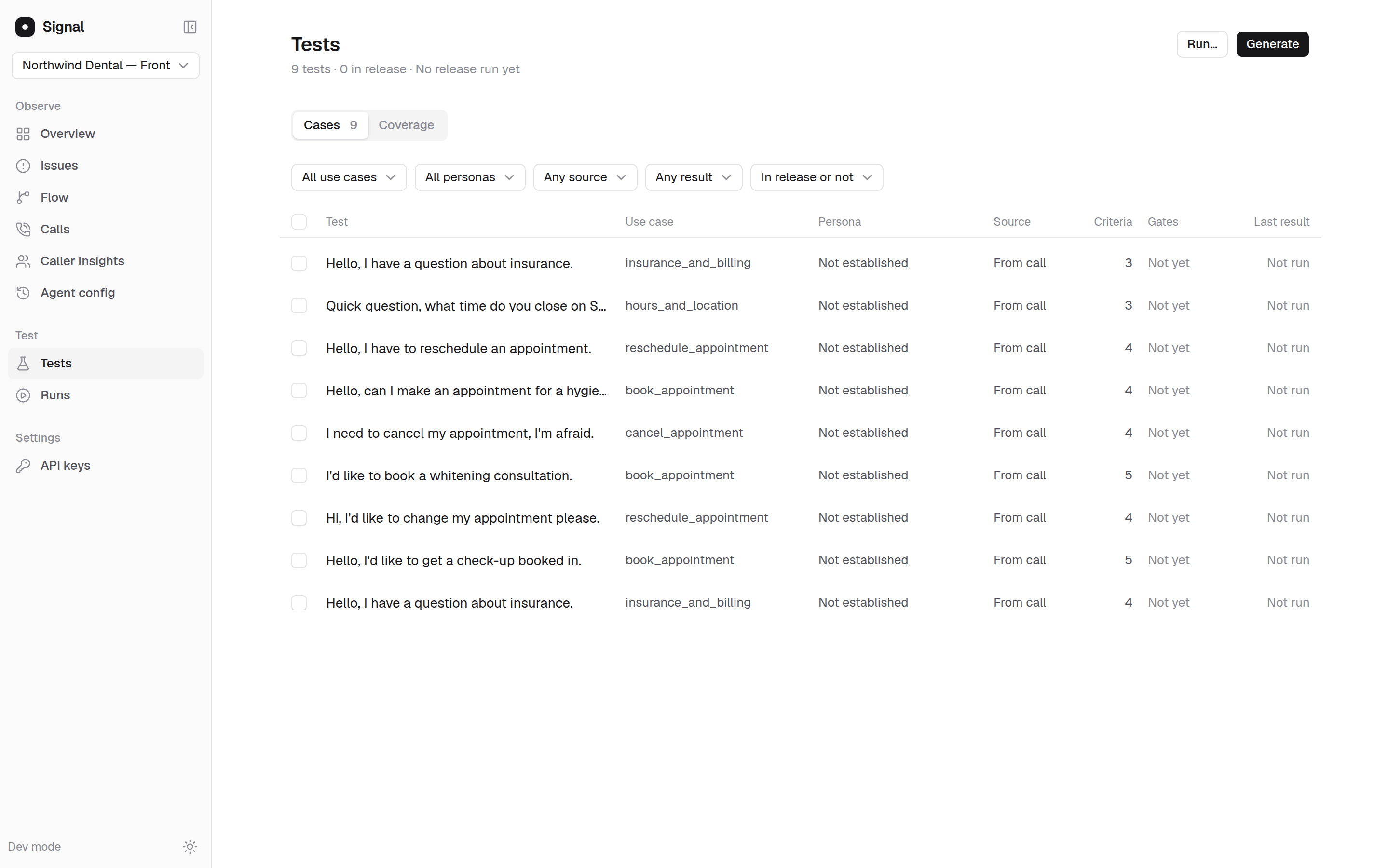
On **Tests**, select **Run…**, or select tests and **Run selected**. Choose which tests (**Selected**, **Filtered**, **Release** or **Group**) and the **Agent version**, then start the run. The dialog shows the **Reserved budget**, and **View run** opens the run.
A run targets a version whose configuration Signal has stored: the version current when you connected, and each new version Signal has seen since. To try a change before it goes live, the copilot can draft it and test it on a copy of your agent; see [Build](/copilot/build).
When Signal sees a new version, it runs the release set automatically if this month's budget covers every test and its possible reruns. If not, the run shows **Waiting for approval** until someone selects **Approve and run**. Add tests to the release set with **In release** on a test or **Add to release** on a selection.
## 4. Read the results
The run page, such as **Run against v12**, shows the **Pass rate** and counts of each result. **Change from the previous run** compares it with the last completed run on another version that covered the same tests: **Fixed**, **Newly broken**, **Still failing** and **Still passing**. Select a row under **Results by test case and persona** for each criterion's verdict, the transcript and Retell's explanation.
| Result | What it means |
| - | - |
| **Passed** | Every criterion was met and Retell's own grader agreed |
| **Failed** | A criterion was not met, with the turn that shows it. A failed test is run again once, and a second failure stays failed |
| **Flaky** | Failed, then passed when run again. Never counted as a pass |
| **Error** | Retell could not run it, the result could not be decided, or the run never reached the step or tool the issue was about. A fix that routes callers around the broken step cannot pass: not reached is not fixed |
| **Caller drift** | The simulated caller stopped acting like the source caller. Neither a pass nor a fail |
A pass means your agent handled that caller, on that path, with those tool responses, and nothing more.
### When a test counts toward a release
The **Gates** column on **Tests** says whether a test's result counts: **Yes**, **Not yet** or **Never**. A replay gates only once it has been calibrated, which plays it three times:
* A test of an issue that does not reliably fail on the version its source call ran on is marked **Does not reproduce**: a test that passes on the broken version tests nothing.
* A test of a path that worked that does not reliably pass on the version in production is marked **Unstable**.
The app has no control for calibration yet. A signed-in person starts it through the API with [Calibrate tests](/api-reference/runs/calibrate-tests); API keys are refused. Until then, replays show **Not yet** and their results do not gate.
Guard tests run more than once on every release and pass only when every play passes. A test is a guard when its issue is marked **Fix deployed**, **Measuring**, **Resolved** or **Regressed**, or when it is marked as one.
## What a run costs
Each test in a run is one simulated call that Retell runs on your account, through your write key, and bills to you. Before a run starts, Signal shows its estimated cost and reserves it against the monthly budget, counting possible reruns. A run the budget cannot cover is refused or waits for approval. Signal's own checking of the results is not charged to your Retell budget. Your plan also includes a number of simulated test calls a month; see [Pricing](/billing/pricing).
## Tests and version comparisons
Tests answer before callers meet the change, for three lanes. A [version comparison](/guides/compare-versions) answers after it ships, for every real caller and every lane. A test can pass while production does not move, if the calls you tested were not the ones that mattered, so read both before you mark an issue **Resolved**.
From a pipeline, the API can create tests, start runs and read results: see [Start a run](/api-reference/runs/start-a-run).
## Next steps
Read what production did after the change.
From an issue on the board to a shipped change.
This documentation is built and hosted on [Mintlify](https://mintlify.com), a developer documentation platform.
## 3. Run them
On **Tests**, select **Run…**, or select tests and **Run selected**. Choose which tests (**Selected**, **Filtered**, **Release** or **Group**) and the **Agent version**, then start the run. The dialog shows the **Reserved budget**, and **View run** opens the run.
A run targets a version whose configuration Signal has stored: the version current when you connected, and each new version Signal has seen since. To try a change before it goes live, the copilot can draft it and test it on a copy of your agent; see [Build](/copilot/build).
When Signal sees a new version, it runs the release set automatically if this month's budget covers every test and its possible reruns. If not, the run shows **Waiting for approval** until someone selects **Approve and run**. Add tests to the release set with **In release** on a test or **Add to release** on a selection.
## 4. Read the results
The run page, such as **Run against v12**, shows the **Pass rate** and counts of each result. **Change from the previous run** compares it with the last completed run on another version that covered the same tests: **Fixed**, **Newly broken**, **Still failing** and **Still passing**. Select a row under **Results by test case and persona** for each criterion's verdict, the transcript and Retell's explanation.
| Result | What it means |
| - | - |
| **Passed** | Every criterion was met and Retell's own grader agreed |
| **Failed** | A criterion was not met, with the turn that shows it. A failed test is run again once, and a second failure stays failed |
| **Flaky** | Failed, then passed when run again. Never counted as a pass |
| **Error** | Retell could not run it, the result could not be decided, or the run never reached the step or tool the issue was about. A fix that routes callers around the broken step cannot pass: not reached is not fixed |
| **Caller drift** | The simulated caller stopped acting like the source caller. Neither a pass nor a fail |
A pass means your agent handled that caller, on that path, with those tool responses, and nothing more.
### When a test counts toward a release
The **Gates** column on **Tests** says whether a test's result counts: **Yes**, **Not yet** or **Never**. A replay gates only once it has been calibrated, which plays it three times:
* A test of an issue that does not reliably fail on the version its source call ran on is marked **Does not reproduce**: a test that passes on the broken version tests nothing.
* A test of a path that worked that does not reliably pass on the version in production is marked **Unstable**.
The app has no control for calibration yet. A signed-in person starts it through the API with [Calibrate tests](/api-reference/runs/calibrate-tests); API keys are refused. Until then, replays show **Not yet** and their results do not gate.
Guard tests run more than once on every release and pass only when every play passes. A test is a guard when its issue is marked **Fix deployed**, **Measuring**, **Resolved** or **Regressed**, or when it is marked as one.
## What a run costs
Each test in a run is one simulated call that Retell runs on your account, through your write key, and bills to you. Before a run starts, Signal shows its estimated cost and reserves it against the monthly budget, counting possible reruns. A run the budget cannot cover is refused or waits for approval. Signal's own checking of the results is not charged to your Retell budget. Your plan also includes a number of simulated test calls a month; see [Pricing](/billing/pricing).
## Tests and version comparisons
Tests answer before callers meet the change, for three lanes. A [version comparison](/guides/compare-versions) answers after it ships, for every real caller and every lane. A test can pass while production does not move, if the calls you tested were not the ones that mattered, so read both before you mark an issue **Resolved**.
From a pipeline, the API can create tests, start runs and read results: see [Start a run](/api-reference/runs/start-a-run).
## Next steps
Read what production did after the change.
From an issue on the board to a shipped change.
This documentation is built and hosted on [Mintlify](https://mintlify.com), a developer documentation platform.