

What you see on a call page
Open any call under Calls. At the top is the recording, played from Retell’s link while Retell still serves it, with the steps the call passed through. Below it:- Transcript: click a line to play from there. The grey figures between lines show how long each side waited before answering, and long agent waits turn amber, then red.
- Who called and why: the use case and the kind of caller, when Signal has read them.
- Why this outcome: how the call ended for the caller, and how sure the reading is.
- What went wrong: problems on this call, each with the place it happened.
- Signals: small observations about moments of this call. See Signals.
- Evidence for: the issues this call is part of.
- Measured: platform facts with nothing inferred, such as turns on each side, the agent’s share of words, tool calls and failures, steps entered, the longest silence, reply times, caller corrections, the version, and Ended by.
Steps, parts and the flow diagram
A step is one node of your Retell conversation flow, or one state of a single-prompt agent. A shared component counts as one set of steps wherever you placed it, so the figures for it are combined across placements, and the calls behind them show any difference. A part is a group of steps that belong together: a shared component, or steps whose names share a bracket prefix such as[Collect Address] Ask address. If your agent uses neither, each step is its own part. Parts can be grouped further into stages, which live in your brief. Group into stages on the Flow page drafts them for you.
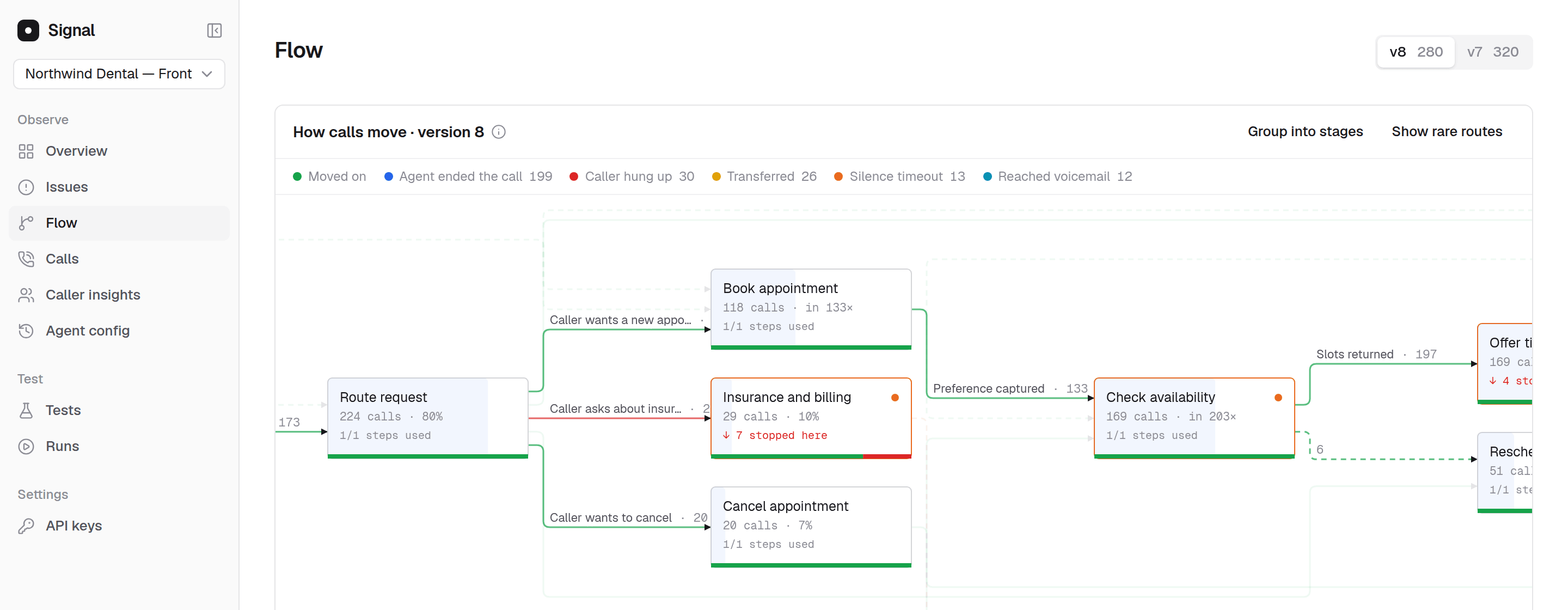
The Flow page for the demo agent, Northwind Dental, on version 8.
- Lines count moves, not calls. A call that passes along a route twice counts twice, so the lines into a part add up to how many times it was entered.
- Rare routes are hidden until you choose Show rare routes.
- Endings are drawn where the call ended. How the call ended (such as the caller hanging up or a transfer) is drawn inside the part the call was in at the time.
- Calls are coloured by how they went: Went well, Went badly, or Caller never spoke.
- Dashed lines are routes your configuration does not define. A global transition is drawn as a normal route, because it is meant to be reachable from anywhere.
Why the original record is kept
Signal stores every call’s full record exactly as Retell sent it. When Signal’s analysis improves, the calls you already imported get the improvement too, including calls from months ago, and you do not need to import anything again. The recording itself stays on Retell.Next steps
Signals
Observations about moments in a call, and how to use them.
Issues
How problems across calls become one issue to fix.